 Tori
Download
An installer and a portable version. Both contain the same program.
0.1.0 is a test version. You may run into all kinds of problems. If you use it on important files, please keep a backup of the originals first. If you find a problem, please tell us at [email protected].
Note: there is no code signature yet, so you may see a warning, but it works fine
A warning from your browser or Windows is not a result of examining this software. Before you go on, please check that the download came from dl.toriinthecat.com and that the file's SHA-256 matches the table below.
As more people use it, the warning may appear less often. For details, see First start.
Current release: 0.1.0 (Windows, Linux).
| Kind | File | Size | Notes |
|---|---|---|---|
| Installer (Windows) | Vault-ZIP_0.1.0_x64-setup.exe | 15.3 MB | Recommended. Adds the right-click menu and lets Vault-ZIP open archives by double-click. |
| Portable (Windows) | Vault-ZIP-0.1.0-portable-win-x64.zip | 22.3 MB | Runs inside its own folder, with the ledger kept there and protected by a passphrase. No right-click menu. |
| MSI for organisations (Windows) | Vault-ZIP_0.1.0_x64_ja-JP.msi | 22.3 MB | Per-machine installs and deployment tools. |
| Linux (.deb) | Vault-ZIP_0.1.0_amd64.deb | 24.1 MB | Debian, Ubuntu, Linux Mint and the like. |
| Linux (AppImage) | Vault-ZIP_0.1.0_amd64.AppImage | 97.0 MB | Runs without installing. |
| Command line (Linux) | vault-zip-cli-0.1.0-linux-x64.tar.gz | 10.0 MB | Only the windowless vault-zip-cli, for automation. |
| Android | Google Play | — | Install from the store. |
SHA-256
9214dd5160461e98062d693e01aad0ad0c57fec644b3b553bff64ee7cdb0cff7  Vault-ZIP_0.1.0_x64-setup.exe
efe1a02e1b0580d0bf1916f5f4e34303ff76ea4175a6b7421debdf6cfc56d864  Vault-ZIP-0.1.0-portable-win-x64.zip
b0bdf7718960c4ec3e0ed2d587d29b4fd699f2b4599d59cdfc027632a2f23ea3  Vault-ZIP_0.1.0_x64_ja-JP.msi
be0895f562d5672a8c1f1fc9fe98f37be14b6b7f47abfc5f4c29496c82d0bcd7  Vault-ZIP_0.1.0_amd64.deb
9c508e002ef456d32fadb76ae7ce606118e2cc0217178f4dd7774712dc94f18a  Vault-ZIP_0.1.0_amd64.AppImage
0bbfa29555822f4bda858e8d13f8b14b799ac98227ba626c5e39158c2f2e8892  vault-zip-cli-0.1.0-linux-x64.tar.gz
To check a download, compare the value shown by PowerShell's Get-FileHash file-name with the value above.
Every package includes a list of its components (SBOM, CycloneDX) and the full licence text of each.
Install from the command line
Press "Copy" and paste into PowerShell or a terminal. The scripts connect to dl.toriinthecat.com only when you run them, and check the signature and SHA-256 before installing.
irm https://dl.toriinthecat.com/install/install.ps1 -OutFile "$env:TEMP\vz-install.ps1"; powershell -NoProfile -ExecutionPolicy Bypass -File "$env:TEMP\vz-install.ps1"curl -fsSL https://dl.toriinthecat.com/apt/vault-zip.gpg | sudo tee /usr/share/keyrings/vault-zip.gpg >/dev/null && echo "deb [signed-by=/usr/share/keyrings/vault-zip.gpg] https://dl.toriinthecat.com/apt stable main" | sudo tee /etc/apt/sources.list.d/vault-zip.list >/dev/null && sudo apt update && sudo apt install -y vault-zipcurl -fsSL https://dl.toriinthecat.com/install/install.sh | sh -s -- --userMore (list versions, check the script before running it)
You can also save the script and read it before running it.
Windows (PowerShell)
iwr https://dl.toriinthecat.com/install/install.ps1 -OutFile install.ps1
.\install.ps1            # latest version (current user, no administrator)
.\install.ps1 -List      # list versions
Linux (apt)
curl -fsSL https://dl.toriinthecat.com/apt/vault-zip.gpg | sudo tee /usr/share/keyrings/vault-zip.gpg >/dev/null
echo "deb [signed-by=/usr/share/keyrings/vault-zip.gpg] https://dl.toriinthecat.com/apt stable main" | sudo tee /etc/apt/sources.list.d/vault-zip.list
sudo apt update && sudo apt install vault-zip
Linux (script)
curl -fsSLO https://dl.toriinthecat.com/install/install.sh
sh install.sh --user      # no sudo: AppImage and CLI under ~/.local
sh install.sh --list      # list versions
The right-click menu on Linux
Items such as "Vault-ZIPで圧縮" (compress) appear in the file manager's right-click menu. Nemo (Linux Mint Cinnamon), Dolphin (KDE), Nautilus (GNOME) and Thunar (Xfce) are supported. Caja (MATE) is not supported yet.
- With the deb, the package installs the Nemo and Dolphin items. The Thunar and Nautilus items are written to your own settings folder when Vault-ZIP starts. They stay after the package is removed; delete them from the settings file if you no longer want them.
- On Xfce, the items do not appear when you right-click icons on the desktop (over the wallpaper). The Xfce desktop has no way to add items. Right-click files inside a Thunar window instead.
System requirements
| System | Windows 10 or later (64-bit, x64). Not tested on Windows on ARM. Linux: x64, Debian-family (such as Linux Mint 22). |
|---|---|
| Also needed | Microsoft Edge WebView2 Runtime. Part of Windows 11 and present on most Windows 10 PCs. Where it is missing, the installer downloads it from Microsoft (the installer connects only in that case). |
| Disk | About 55 MB once installed (the installer itself is about 15 MB). The ledger and settings grow only as you use them. |
First start
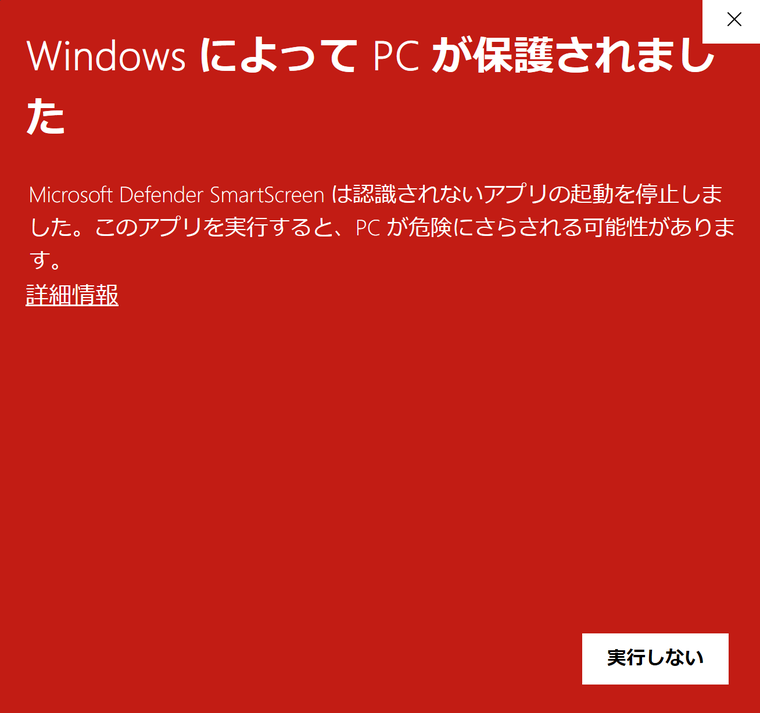
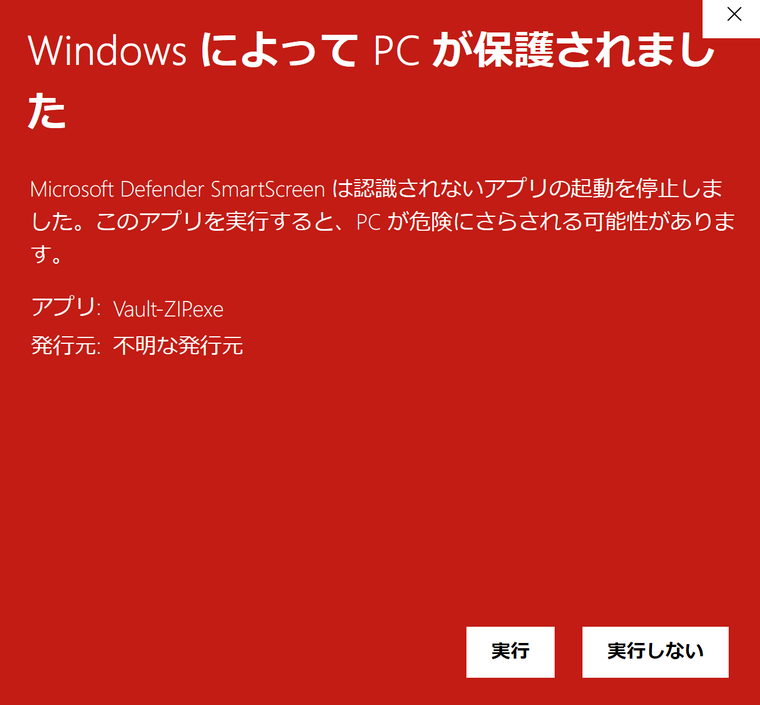
Vault-ZIP is not code-signed yet, so Windows or your browser may warn you when you download or start it.
- If "Windows protected your PC" appears, click "More info", then "Run anyway" (screens below; the Windows here is in Japanese).
- Check that the file's SHA-256 matches the value above before running it.
On a PC with Windows 11 Smart App Control turned on, unsigned apps may not start.
Uninstalling
Uninstall Vault-ZIP from Settings → Apps → Installed apps. Uninstalling keeps your password ledger and settings (there is no screen asking whether to delete them), so a reinstall carries on where you left off. To remove the ledger too, delete its folder (%APPDATA%\VaultZip) yourself after uninstalling. This cannot be undone.